Free EasyEDA Simulation Alternative Online — NodeSim vs EasyEDA
Updated November 2026 • Browser SPICE vs Cloud PCB EDA
EasyEDA (backed by JLCPCB and LCSC) is one of the web’s most popular electronics suites for schematic capture and PCB layout. However, EasyEDA’s primary mission is Printed Circuit Board manufacturing—not interactive SPICE lab simulation. When you simply want to wire up an amplifier, run an AC Bode sweep, sweep parameters, or teach an ECE lab without cloud logins or footprint selection overhead, NodeSim runs real ngspice locally in your browser in seconds.
Zero-Friction Browser SPICE vs PCB-First Cloud EDA
Use EasyEDA when ordering fabricated PCBs from JLCPCB. Use NodeSim when learning circuit theory, validating analog/power topologies with real ngspice WebAssembly, or sharing one-click lab schematics with students.
Side-by-Side Feature Comparison
| Capability | NodeSim | EasyEDA |
|---|---|---|
| Primary Focus | SPICE simulation & ECE learning | Schematic capture & JLCPCB PCB layout |
| Simulation Engine | ngspice WebAssembly (runs locally in browser) | Cloud LTspice / ngspice backend |
| Account Required | No — simulate immediately | Yes — EasyEDA / LCSC account required |
| Time to First Waveform | Under 30 seconds (no footprint assignment) | Moderate (Sim mode + cloud queue + footprint model mapping) |
| Analysis Types | Transient, AC Sweep, DC Sweep, .op, .noise, .step, .step temp | Transient, AC, DC Transfer via Sim mode |
| Parametric & Temp Sweeps | Visual .step UI & -40°C..125°C temp sweep | Manual SPICE text directives |
| Interactive Current Visualization | 60 FPS real SPICE current flow particles + live sliders | Static waveform plot window only |
| Community Circuit Library | 54+ curated SPICE-verified labs + one-click fork | Massive user-contributed part/module catalog |
| Shareable Links | Instant /c/<shortId> URL with compressed schematic & OG preview | Cloud project sharing (requires account for editing) |
| PCB Layout & Gerber Export | No (KiCad .net netlist export only) | Full multi-layer PCB router + JLCPCB 1-click PCBA |
| Engineering Exports | IEEE PDF Lab Report, .cir netlist, KiCad .net, CSV, PNG | Gerber, BOM, Pick-and-Place, EasyEDA JSON |
| Offline Privacy | 100% client-side execution | Cloud-dependent simulation server |
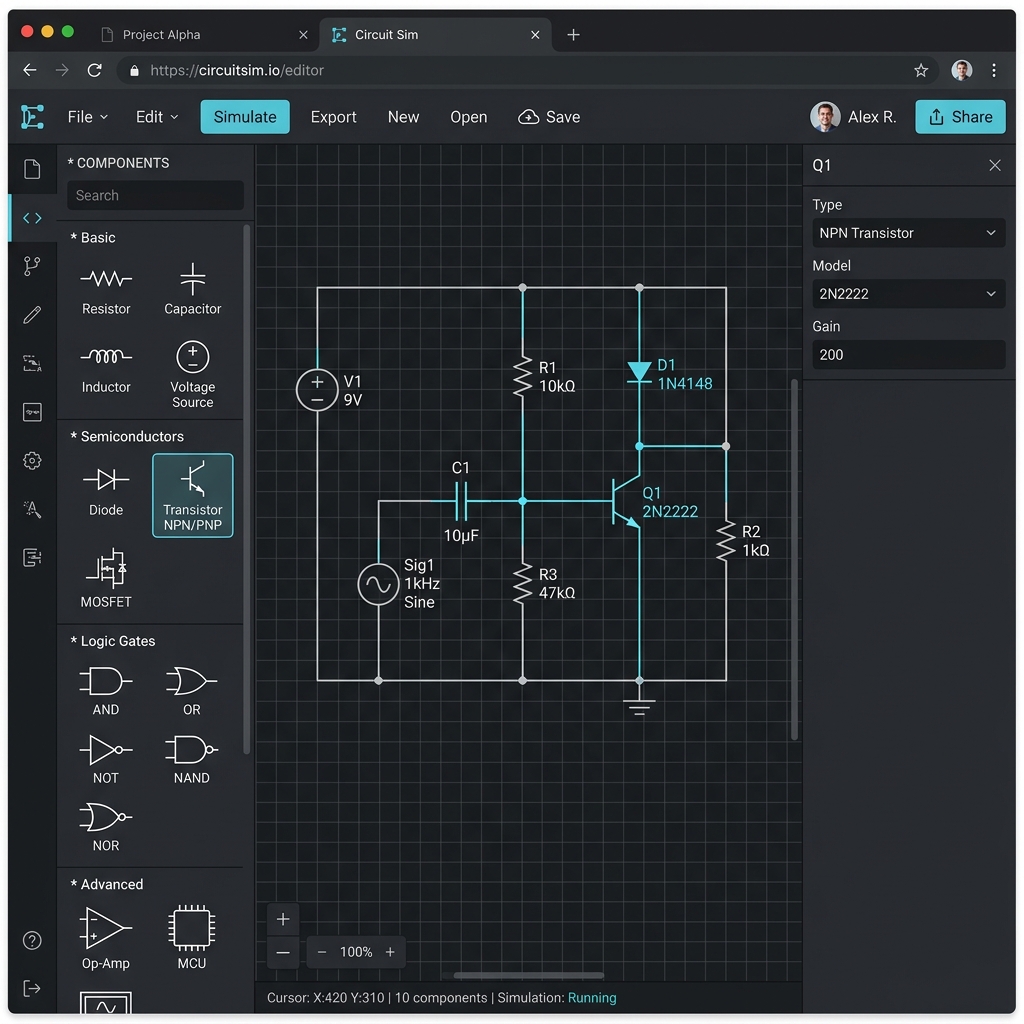
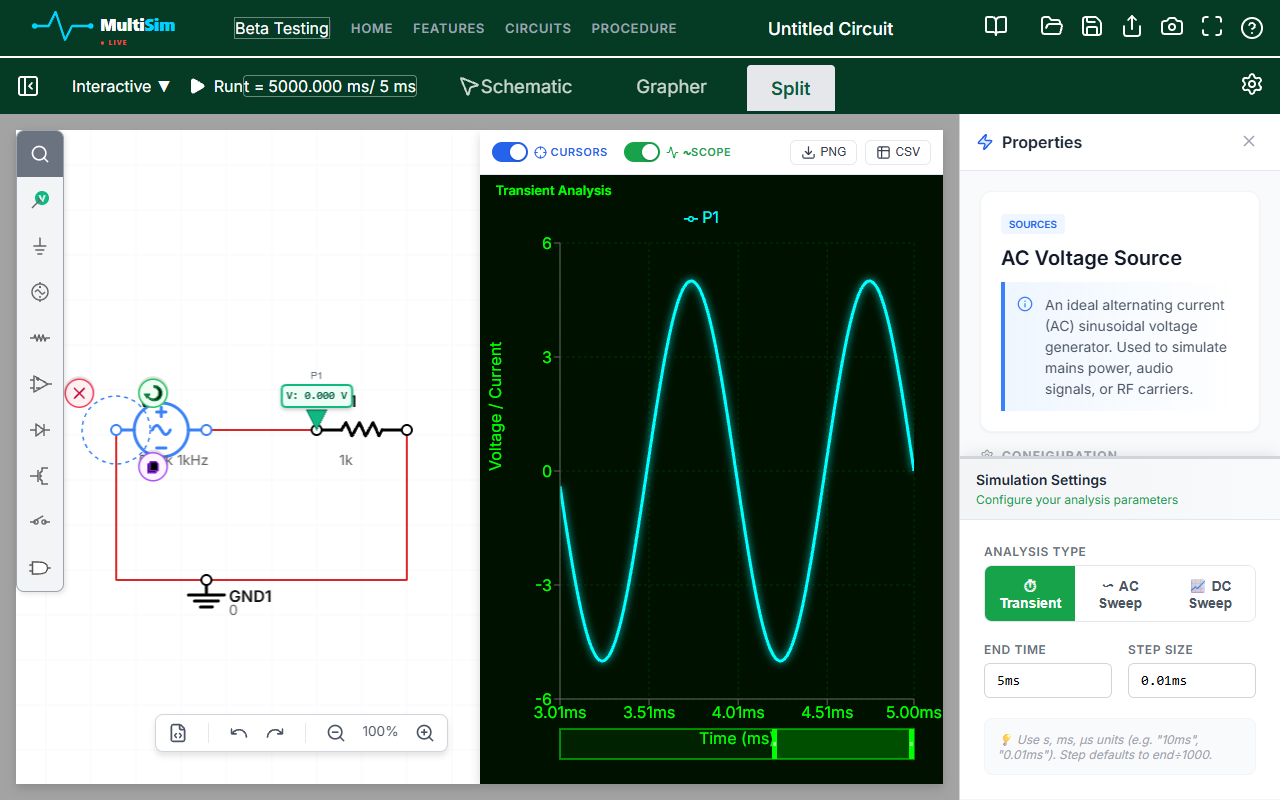
Inside the NodeSim Browser Workspace
Why EasyEDA Simulation Feels Heavy for Circuit Analysis & Education
Every EDA platform optimizes around its core user loop. Because EasyEDA Standard and EasyEDA Pro are engineered to turn schematics into ordered fiberglass PCBs assembled by JLCPCB, their component architecture ties heavily into physical footprints, LCSC part SKUs, pin-package mappings, and Design Rule Checks (DRC) aimed at copper traces rather than ideal textbook lab experiments.
For hardware engineers preparing a production BOM, that workflow is a superpower. For a student debugging a Sallen-Key active filter, checking common-emitter BJT Q-point stability across temperature, or demonstrating buck converter ripple before class, switching EasyEDA into Simulation Mode often hits practical friction: students accidentally drop non-simulatable PCB symbols onto the sheet, wait on remote simulation servers, and struggle to extract quick clean figures for lab reports.
NodeSim cleanly separates pure circuit physics from PCB packaging. Every component in NodeSim’s library either maps directly to an empirically tested ngspice primitive/subcircuit or carries an explicit quarantine notice so users never waste an afternoon wondering why a sensor breakout symbol fails to simulate.
Local WebAssembly ngspice Speed vs Cloud Simulation Queues
EasyEDA executes SPICE runs on remote cloud infrastructure, introducing login gates, network round-trip latency, and occasional throttling during peak semester deadlines. When iteratively tweaking resistor feedback values or sweeping capacitor values across a resonant tank, waiting several seconds per click breaks the investigative flow.
NodeSim compiles the complete ngspice engine directly to WebAssembly and pre-warms isolated worker instances in the background inside your browser tab. Typical RC filters, op-amp stages, and 555 timers solve in tens to hundreds of milliseconds locally on your own CPU—even on school Chromebooks, locked-down university lab workstations, or Linux laptops.
Because simulation runs client-side, your proprietary schematics never need to leave your browser unless you explicitly publish to the Community gallery or generate a short /c/ link.
Built-In Parametric Sweeps, Noise Analysis, and IEEE Lab Reports
Engineering students and analog hobbyists rarely want just a single static transient trace. To understand how component tolerance, load resistance, or ambient operating temperature shifts circuit margins, NodeSim embeds GUI workflows for .step parametric sweeps, thermal diode/BJT temperature sweeps (.step temp), and integrated RMS spot noise analysis (.noise) directly alongside the oscilloscope grapher.
- 60 FPS Interactive Physics: Toggle switches and drag resistance sliders during live simulation while ghost trace overlays show before/after shifts.
- One-Click KiCad & SPICE Bridges: Validate topology math in NodeSim first, then export standard SPICE netlists (.cir) or KiCad netlists (.net) when ready for PCB layout.
- Instant Academic PDF Reports: Compile schematic snapshots, component tables, and annotated waveform plots into print-ready IEEE lab reports without manual screenshotting.
- 54+ Verified ECE Templates: Launch pre-built Wheatstone bridges, Wien bridge oscillators, Class-AB buffers, half/full adders, and DC-DC converters directly into the workspace.
When You Should Choose EasyEDA Over NodeSim
NodeSim does not compete on physical PCB CAD. You should immediately choose EasyEDA (or KiCad) once your design moves from electrical verification into physical board manufacturing:
- Multi-Layer PCB Layout: Routing differential USB traces, pouring ground copper zones, placing SMT 0402 footprints, and checking copper clearances require a true PCB EDA like EasyEDA or KiCad.
- Instant BOM & Turnkey Assembly: EasyEDA integrates live LCSC stock pricing and one-click JLCPCB SMT assembly ordering directly inside the editor.
- Hierarchical Multi-Sheet Products: Complex carrier boards with hundreds of connectors, mechanical mounting holes, and custom silkscreen art belong in a full EDA suite.
The Optimal Workflow: Simulate in NodeSim, Route PCBs in EasyEDA or KiCad
Experienced hardware engineers frequently separate circuit concept verification from physical board layout. Sketching your op-amp conditioning stage, voltage regulator loop, or 555 PWM timer first inside NodeSim lets you confirm gain, phase margin, startup current, and thermal headroom in under five minutes with zero account setup.
Once your component values are locked in via SPICE, export the netlist or replicate the verified schematic inside EasyEDA or KiCad to assign exact package footprints (e.g., SOIC-8 vs DIP-8) and generate Gerber manufacturing files confidently.
Pre-PCB Analog Verification Checklist Before Opening EasyEDA
Catching an analog design mistake on screen inside NodeSim takes thirty seconds and costs $0.00; discovering an inverted feedback pin, under-damped filter oscillation, or undersized buck inductor after receiving five fabricated boards from JLCPCB costs weeks of project momentum. Before leaving NodeSim to lay out footprints and copper pours in EasyEDA, run four fast checks:
First, verify DC Operating Point (.op) across every BJT, MOSFET, and op-amp stage to guarantee transistors stay comfortably inside linear headroom or full Rds(on) saturation rather than stalling in half-on thermal dissipation. Second, execute an AC Bode sweep across filters and op-amp feedback loops checking that -3 dB corner frequencies and phase margin stay healthy. Third, sweep critical passive tolerances and extreme ambient temperatures (-20 °C to +85 °C) using NodeSim’s .step tools. Fourth, confirm power dissipation and startup surge currents in Transient mode before assigning SMD resistor wattages (0402 vs 0805 vs 1206) inside EasyEDA.
- Zero-Account Lab Accessibility: : Unlike EasyEDA’s LCSC account gate, NodeSim lets lab instructors share instant runnable examples via URL during lectures, quizzes, or open-book exams where signing students into commercial vendor accounts is undesirable.
- Clean Educational Focus vs Cluttered EDA Menus: : Beginners skip silkscreen layer settings, copper clearance rules, and LCSC inventory dialogs entirely until their underlying circuit physics works flawlessly in ngspice.
Frequently Asked Questions
What is the best free online alternative to EasyEDA for circuit simulation?
NodeSim is a specialized free browser alternative for SPICE simulation. Unlike EasyEDA—which focuses on PCB layout and requires login—NodeSim lets you draw and simulate circuits with real ngspice WebAssembly instantly without creating an account.
Does EasyEDA run SPICE locally in the browser like NodeSim?
No. EasyEDA sends simulation netlists to remote cloud servers and requires an account, whereas NodeSim executes real ngspice locally on your device via WebAssembly.
Can NodeSim design PCBs or export Gerber files like EasyEDA?
No. NodeSim is strictly a schematic capture and SPICE circuit simulation environment (supporting .cir SPICE netlists and KiCad .net exports). Use EasyEDA or KiCad once you are ready for PCB layout and Gerber generation.
Why do EasyEDA parts sometimes fail to simulate?
Many EasyEDA user-library symbols only define PCB footprints and omit valid SPICE models or pin mappings. NodeSim pairs simulatable components with audited ngspice primitives and clearly badges behavioral/non-simulatable blocks upfront.
Can I share a NodeSim circuit link like an EasyEDA project?
Yes. NodeSim generates compact 8-character /c/<id> share URLs with live link previews or self-contained compressed URLs that open directly into a runnable simulation without forcing visitors to sign in.
Runs 100% locally in your browser via WebAssembly — zero account walls, zero downloads.